Lightspeed Classroom CVE-2026-30368 - Weak Authentication Allowing Unauthorized Remote Control of Student Devices
4/20/2026
Introduction
Lightspeed Classroom is a popular browser extension used by thousands of schools worldwide, including at least 28 of the top 50 in the US, by cities as large as Los Angeles and Chicago, to keep track of students on school-issued devices in the classroom. It enables teachers to view, control, and manage what students see on their devices. This vulnerability allows an attacker to connect to a desired student’s school-issued device bearing the extension and perform actions meant to be done by teachers, such as sending URLs, closing tabs, and even locking screens of students. An attacker requires only a target email address and district customer ID to initiate this remote control, without possessing Lightspeed credentials, elevated permissions, or physical access to the device. Since the Chrome extension is limited to using username/email only to authenticate users, identity can easily be spoofed to authenticate as another person.
The core issue is Lightspeed’s reliance on obfuscation to enforce integrity. They placed authentication code in an obfuscated WebAssembly file written in Go, which is notoriously difficult to reverse engineer. However, the file can be placed into a harness that mimics the real extension to extract authorization tokens and impersonate arbitrary users within the system. Obfuscation was also applied to worker.js, which includes most of the application’s code. The code is still navigable as long as you use any deobfuscator and unminifier website and have a decent editor that lets you view references.
Threat Model
- Attacker is unauthenticated to the Lightspeed Classroom Portal
- Attacker does not control district infrastructure
- Attacker does not modify the victim’s device
- Attacker does not possess Lightspeed-issued credentials
- Attacker requires only:
- student email address
- district customer ID
The Extension
LS Classroom comes packaged as a browser extension meant for provisioning to students.
File structure:
The Lightspeed Classroom extension uses Ably for realtime communication from a controller (Lightspeed GUI or unauthorized device) to a student’s device (client).
The extension authenticates into Ably using a 3 part process:
-
Part 1: The Policy
- The worker (
worker.js) makes a POST request tohttps://devices.classroom.relay.school/policywith the user’s email in the JSON request body (for example:{ username: "example@school.edu" }). It also includes thecustomerid,content-type,x-api-key, andversionheaders. Any person who has taken a look at the Lightspeed extension will know where to find the values ofcustomerid(specific to district). Thex-api-keyis Lightspeed’s Ably API key, which it also uses for the policy endpoint. The key is a constant across all Lightspeed customers. I will not reveal the value here, but if you have some technical skill, you should be able to find it pretty easily. - The policy looks like this:
- The values that really matter are as follows:
class_schedule,schedule_type,on_campus_only,campus_networks,tab_limit,chromebook_only, andjwt. class_schedulecontains the times that teachers are allowed to watch students. In reality, teachers can do everything except for view tabs and watch screens even outside of these times. During this time, a group is considered active.schedule_typedictates whether the schedule is a fixed bell schedule, or an adhoc schedule where a teacher can update it on the fly. Most secondary schools primarily use adhoc schedules while elementary schools use bell.on_campus_onlyis self explanatory. If true, Lightspeed will not even connect to Ably if the device’s IP (determined by making a request tohttps://devices.classroom.relay.school/ip) is not inside one of the ranges insidecampus_networks.tab_limitlimits the number of tabs a student is allowed to open.chromebook_onlydictates if only Chromebooks are allowed to connect to Lightspeed.jwtis a JSON web token that is eventually passed on later in the process. It includes the following payload:
- The worker (
-
Part 2: Getting the Ably Token
- This is the most complex phase and the phase where the vulnerability occurs.
- The
classroom.wasmfile is loaded by the worker, and calls theLSClassroom.WASM.Setupfunction with the Customer ID and version. - The worker calls
LSClassroom.WASM.ConfigureClassto define a class object that will hold a JWT that the WASM will generate later on. - The worker then calls
LSClassroom.WASM.PolicyDatawith the policy JWT, user email, and user GUID. These, along with some district specific information are used to create a signing key for the JWT. - The worker calls
LSClassroom.WASM.GetIdentwith no arguments to kick off the process of generating the JWT. - The JWT is generated completely in Go. It does not use any JS APIs that could potentially be intercepted or otherwise tampered with.
- After generating the JWT, the object passed to
ConfigureClassreceives the token in itsjwtproperty. This is where the vulnerability captures the JWT (described in more detail later).
-
Part 3: Connecting to Ably
- The worker initiates the connection to Ably with the following code (deobfuscated and with variable names):
- The client must get the Ably JWT (different from the previous JWT that the WASM generated) from Lightspeed’s Ably auth servers. These auth servers were incorporated into Lightspeed after vulnerabilities exploited the ability to connect to any user from any Customer ID using just the API key and the key ID, the most notable use of these vulnerabilities being the Lee County Incident.
- The client makes a GET request to
https://ably.lightspeedsystems.app?clientId=student@school.edu&rnd=random_value_generated_by_ablywith the following headers:jwt- The JWT the WASM generated earlierexp- 10x-api-key- The Ably API keycontent-type- application/json
- The auth server returns the JWT token that is used to connect to Ably. This token only allows connections to ONE user. Previous vulnerabilities exploited the ability to connect to multiple channels on the same token (or using meta channels) but that has since been patched. If your JWT (the one in the request headers) is wrong, the server will return a 403.
- Finally, the client connects to the Ably channel tied to the user (the channel name is the customer ID, then a colon, followed by the user email. For example:
67-6741-A000:student@school.edu).
Now that the extension (or unauthorized device) has successfully connected to Ably, it can publish (send) or subscribe (listen for) messages sent in the channel.
IsClassroomActive is a conditional check widely used throughout the extension. It checks the following:
- If
chromebook_onlyis true in the policy, check if the user is on a Chromebook usingchrome.runtime.getPlatformInfo, which is spoofed to return ChromeOS values in the vulnerability. - If
on_campus_onlyis true in the policy, check if the user’s IP address is in one of the allowed ranges insidecampus_networks.
Lightspeed Classroom uses the following Ably messages:
-
tabs- Current tab data including currently focused tab. Published by the client every time a new user enters the Ably channel, or when a presence event is sent with{"viewingTabs": true}in the message data. Requires IsClassroomActive to be true and for the current time to be within the specified class schedule in the policy.-
Example
-
-
remoteDebug- Prints a message to the debug console. Does not execute any arbitrary code. -
closeTab- Closes a tab given itsidand/orurlobtained from thetabsmessage. Requires IsClassroomActive.-
Example
-
-
focusTab- Focuses a tab given itsidand/orwindow_idobtained from thetabsmessage. Requires IsClassroomActive.-
Example
-
-
tm- Sends a notification to the client. Requires IsClassroomActive.-
Example
-
-
url- Sends a URL to the client. Requires IsClassroomActive.-
Example
-
-
lock- Locks a client’s tabs with the specifiedlockMessageuntil optionallockDuration. Requires IsClassroomActive.-
Example
-
-
unlock- Unlocks a client. Takes arguments but they are only relevant to Lightspeed’s hall pass system which we don’t know or care about. Does NOT require IsClassroomActive, probably to prevent teachers from locking students last period and forgetting about it.-
Example
-
-
policyUpdate- Refetches the policy from Lightspeed servers. Most likely used to update policy when adhoc schedules are made active. Only updates group settings, not district settings. -
setState- Sets state of a hall pass. Requires IsClassroomActive. We have not had any experience with this function due to none of our schools using Lightspeed hall passes. -
startRecording- Starts a recording. We really don’t know much about this. -
updateExtension- Callschrome.runtime.requestUpdateCheckto force an update of the extension. -
classpass- Something to do with Lightspeed hall passes. Again, we don’t know much about this one. -
sendGroupUpdate- We think this updates a group’s GUID but the obfuscated code is really hard to read and we’re not sure. -
request_rtc- Starts the process of connecting to view the client’s screen via WebRTC. The callback function itself does not include any conditional checks. Those are done later in the RTC process. After receiving the message the function hands it off tortc_connection.jsusingchrome.runtime.sendMessage.-
Example
-
-
offer_rtc- The next step in the RTC process. The client publishes this offer to the viewer/controller with ICE servers and SDP data. -
answer_rtcandanswer_rtc_ice- The final step in the RTC process that is handled on Ably. This is sent back to the client from the viewer’s browser. The function then hands it off tortc_connection.js, which starts the WebRTC connection. The worker then checks for any active groups, and for IsClassroomActive to be true. It then starts sending frames fromchrome.tabs.captureVisibleTabtortc_connection.jsevery 2 seconds, which then processes it and broadcasts it to the WebRTC stream which can then be viewed.answer_rtc_icecoordinates ICE servers with the viewer. -
groupUpdate- We know little about this message. We have intercepted it once before. From what we can tell, we think it sends additional browsing statistics to the viewer while the teacher is “inspecting” a student in the GUI. It is published by the client. We’re not really sure what triggers it.-
Example
-
-
The RTC
When a teacher (or unauthorized third party) is attempting to view the student’s screen, messages are sent through Ably and eventually a peer to peer WebRTC connection is created. This connection is facilitated inside of
rtc_connection.js. It is loaded on theoffscreen.htmlbackground page. The extension useschrome.tabs.captureVisibleTabto send frames tortc_connection.jsvia Chrome’s messaging protocol to the viewer. -
The Validation
- The Lightspeed classroom WASM executes 4 validation checks before execution can continue. The checks are as follows:
- Check 1 verifies the extension’s
chrome.runtime.id. As long askeyis unchanged inside the manifest, this check will pass. - Check 2 verifies the hash of
manifest.json. - Check 3 verifies the hash of
worker.js. This is the first place where the vulnerability happens. - Check 4 verifies the integrity of the
chrome.identity.getProfileUserInfofunction. If the function has been tampered with, which it would have to be with if the identity is being spoofed, the.toString()will return the contents of the function. This will trigger check 4 to fail. If the function is legitimate, the.toString()will returnfunction getProfileUserInfo() { [native code] }which tells the WASM that the function has not been tampered with. This is another place where the vulnerability happens.
The Vulnerability
Earliest known affected extension version: 5.1.2.1763770643
This vulnerability affects all versions of the extension, however.
The vulnerability aims to execute worker.js inside of a non-browser environment (such as Node.js) but for it to work as if it were inside a browser, then extract the JWT generated by the WASM and pass it back to the file that loads and executes the worker, and subsequently connect to Ably and expose opportunities for bad actors to perform unauthorized actions. This loader or “harness” needs to spoof almost every Chrome API for the worker to function properly. The loader we used in our initial testing of the vulnerability is at the bottom of the page.
The vulnerability itself starts out in the validation checks before the extension starts up. In order to use a modified worker.js to extract the JWT to send to the auth server, validation check #3 (hash check of worker.js) needs to be bypassed. Importantly, the worker.js includes the Go runtime that facilitates communication between the WASM and the worker.
During check 3, the WASM calls chrome.extension.getURL('worker.js') which retrieves the full URI that it has to fetch in order to access the worker and check its hash. In the Go runtime that is located in the worker, there is a function that handles the js.valueCall Go syscall. All function calls, including getURL, pass through this function to be processed. This is where the vulnerability happens. We can manipulate the function that handles js.valueCall to change the arguments passed to the getURL function (without modifying the WASM binary) to a different file path that includes a non-modified worker. This is done by calling two functions, one before the call is actually made inside of JS (by Reflect.apply), and one after, to manipulate its output.
Next, in check 4, the WASM calls chrome.identity.getProfileUserInfo.toString() to verify that the function has not been tampered with. The expected output is function getProfileUserInfo() { [native code] }. This can be manipulated in the exact same way as check 3. Once check 4 is successful, the WASM will trust the environment as a real student device and continue execution of the worker.
Below is the modified js.valueCall handler, along with the functions called before and after the value is applied:
The next step is to keep running the service worker until the JWT generated by the WASM can be extracted. Our implementation of the vulnerability extracts the JWT to a variable after the parameters for the Ably connection are defined. Once the loader detects that the JWT variable has been defined, it kills the worker to save processing power, authenticates with Ably, and connects or passes on the token to another file or web interface. Below is the JWT extraction code inside the worker:
Finally, the loader can connect to a student’s Ably channel using the received token. The code below demonstrates how an unauthorized third-party can connect to a student’s computer and open a webpage on their device.
An unauthorized third party can now perform any standard Lightspeed Classroom action on the student’s device, including sending URLs, closing tabs, locking and unlocking them, viewing their screen, and sending notifications. This becomes very dangerous and a serious breach to the privacy of students given the level of access granted by Lightspeed Classroom. While mass actions cannot be directly performed, an unauthorized third party can still iterate through a list of students to target given a decently powerful computer.
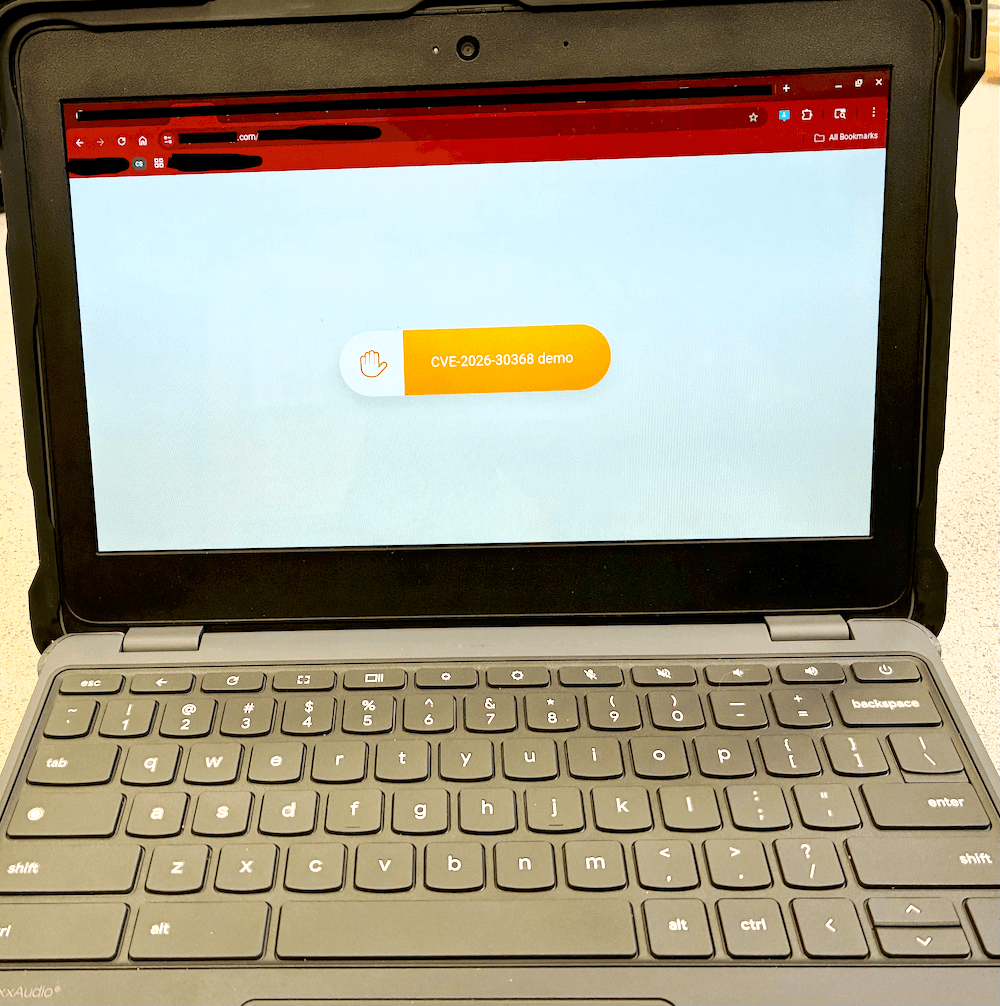
Fig. 1: Demonstration of control over a Lightspeed classroom client.
A proof of concept can be found here.
Impact Summary and Root Cause
This vulnerability enables unauthorized third parties to impersonate legitimate users within Lightspeed Classroom and gain real time control over student devices. An attacker does not need physical access, administrative credentials, or any elevated privileges. Knowledge of a student’s email and district Customer ID is all it takes to initiate an attack.
The impact includes, but is not limited to:
- Unauthorized screen viewing via WebRTC
- Forced opening of arbitrary URLs
- Tab closure and focus manipulation
- Screen locking and unlocking
- Delivery of arbitrary notifications to students
These actions can be performed remotely, at scale, and can cause severe destructive effects in educational institutions using Lightspeed Classroom.
The root cause of this vulnerability is reliance on integrity of client-side code and security through obscurity via obfuscation for authentication and integrity checks. Identity verification, environment validation, and token generation are all executed fully client-side and relying on obfuscated JavaScript and WebAssembly rather than server-side verification.
Specifically:
- Identity is established through values that can be manipulated by the user
- Integrity checks rely on JavaScript APIs that can be spoofed or intercepted
- The WebAssembly runtime assumes the environment is legitimate once superficial validation checks pass
- Authorization tokens generated client-side are trusted by backend services
As a result, an emulation of a browser environment is treated as a legitimate student device.
Attempted Mitigations
Lightspeed has been informed of the vulnerability by at least 1 school district since January 22nd, 2026.
As of April 20th, 2026, a patch for the issue has not been pushed, and everything documented here still works.
TL;DR
Lightspeed Classroom can be run outside of a browser by an unauthorized actor by bypassing validation checks by manipulating the WebAssembly runtime inside of the service worker. This leads to them being able to obtain authorization tokens for any user from any district that uses Lightspeed Classroom, and in turn, being able to perform actions on student devices that are normally reserved for teachers or administrators for usage to manage student browsing. The attacker does not need any info except for the email and customer ID of their target.
Demo video
Conclusion and Final Notes
This vulnerability demonstrates that obfuscation and client-side enforcement are insufficient safeguards for systems that exercise real control over user devices. When authentication tokens and authorization decisions can be from an emulated environment, trust boundaries collapse.
Given the worldwide scale at which Lightspeed Classroom is deployed, the implications extend beyond individual misuse and represent a systemic risk to student privacy and safety. Addressing this issue requires architectural changes rather than incremental patches. Lastly, it is important to mention that this report intentionally omits automation tooling and fully operational exploit chains.
Credits
- Discovery & proof of concept: truekas
- Web Interface & initial testing: incognitotgt
- Writeup: truekas